
.png?width=50&name=34C0AE28-DE08-4066-A0A0-4EE54E5C1C9D_1_201_a%20(1).png)
Halcyon programming note: we are all in movement this week as we prepare to gather the entire team in San Francisco next week. While we’re thrilled to get our team together, we will be taking a break from our normally scheduled content, so see below for three announcements from us to hold you over!

In 2025, we built the foundations of Halcyon’s technology stack. At the center, a data platform, and surrounding it, some key applications like Search, Query, Alerts, and Data Subscriptions.
All together, they comprise the core of our software and services, and deliver meaningful value for customers. The work was unglamorous, gritty, and entirely necessary.
In 2026, we’re going electric ⚡ Now that we’ve built strong foundations, we’re looking to create even more value through automation — via familiar instruments like APIs — and orchestration — via newer tools like agents.
Today, we’re stoked to announce the launch of Halcyon’s Agentic Alerts, now available to all Halcyon users. We built Agentic Alerts based on our experience managing our existing Alerts product for the past year, and relentless customer feedback. I try to get straight to the point, but I want to share a little about how we got here, why Agentic Alerts are a step-change in our information monitoring capabilities, and how we expect it to evolve over time.
Halcyon Alerts Origins
We launched the first version of Halcyon Alerts in December 2024, driven by the observations that energy professionals have to stay on top of infrequent-but-critical changes, and that these changes come from many, many different sources (50 state PUCs, 8 grid operators, FERC, and more). It’s impossible to do manually, and existing solutions are approximated, siloed, and ultimately insufficient.
We built Halcyon Alerts to help energy professionals catch everything. The December ’24 version allowed users to subscribe to Alerts from a specific commission/agency (e.g. The CPUC or MISO) and get a list of all new filings. It offered perfect recall, catching all the signal, but terrible precision: there was no ability to specify which new documents were important, or extract key information, or offer any meaningful customization beyond “give me everything.” It was a true firehose, time-consuming and overwhelming for even the wonkiest of energy nerds.
Over the last year, we’ve improved the signal-to-noise ratio. We introduced document and docket summaries to the notification emails. We extended Halcyon’s search filters to Alerts so users could now, for example, see only documents that contained the word “Exelon” or only “Comment” filing types from Louisiana and Arkansas.
These were good improvements, but they did not solve the main problem: still too much noise.
Launching Agentic Alerts
Today, we’re very pleased to launch V1 of Agentic Alerts. Whereas previous versions of Alerts ultimately surfaced new documents/dockets/filings, Agentic Alerts now surfaces key information from within those documents. This capability is powered by combining a customizable Halcyon query with automated email notifications. The email also provides a link to see all the new documents that informed the query response.
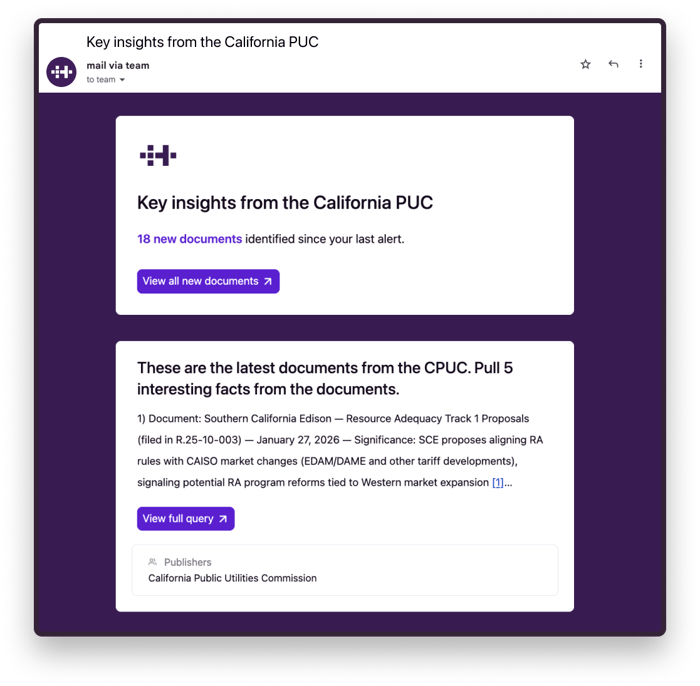 An example: suppose you work for a landscaping company that serves utilities. Imagine getting a weekly alert with the answer to “Do any of these new documents contain RFPs or expense lines for tree trimming? If so, which utility is the buyer? How much is it planning to spend?” This email contains a much richer signal and is much more useful than an exhaustive list of all new documents that contain mention of “landscaping” or “tree trimming.”
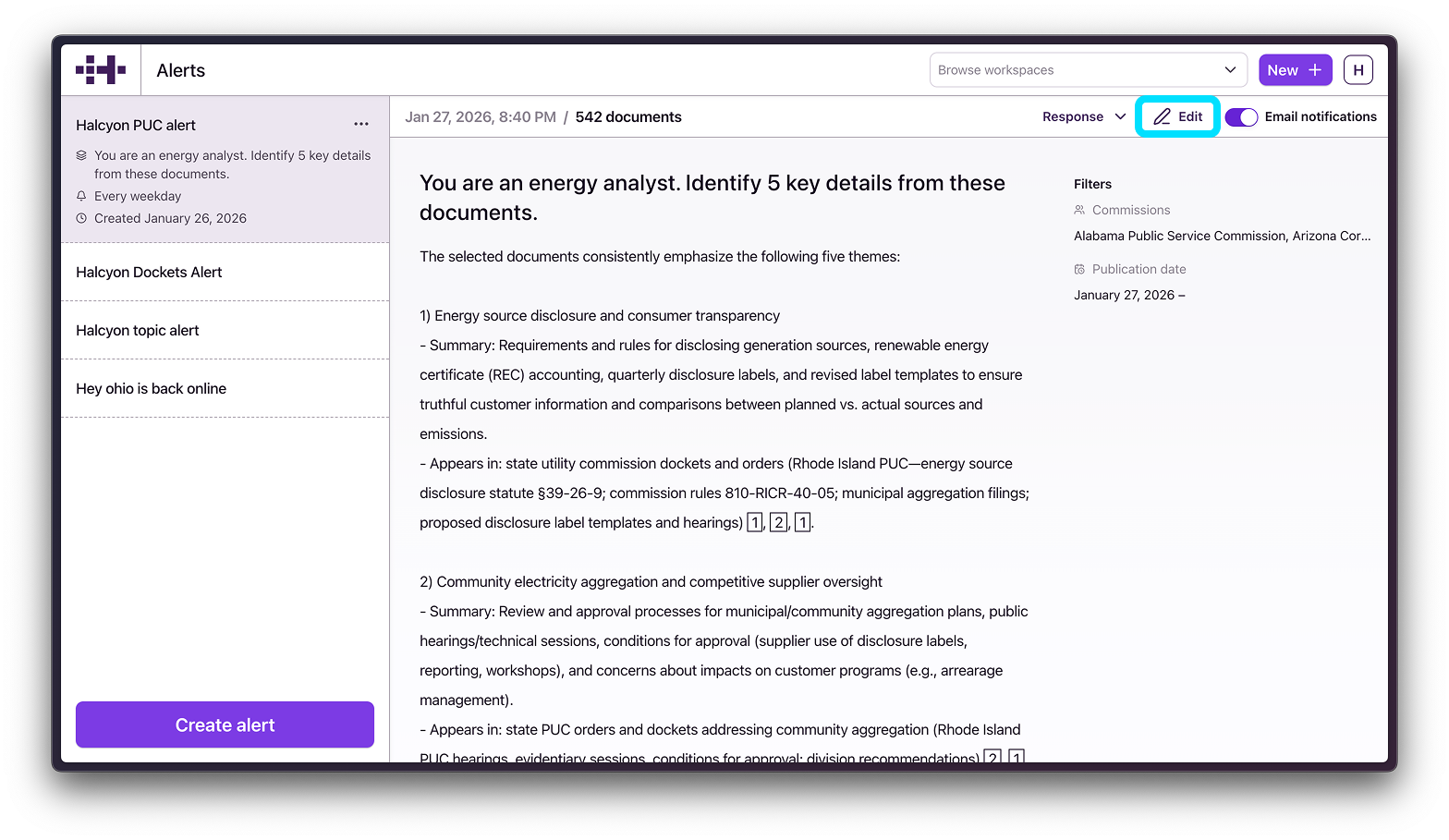
Agentic Alerts retain the core functionalities of the older Alerts: you still define search constraints, a title, and desired delivery frequency. Now, you also define a Query, which will be run against all of the new documents we add and deliver the response in the body of the email.

There are three ways you can set up a new alert.
First, you can click “Create Alert” on any query response in Halcyon. This will create an alert that uses the query and search that generated the result, and apply them to new documents added in the specified time period.
.png?width=700&height=415&name=Create%20from%20query%20response%20(1).png)
Second, login to Halcyon, navigate to the Alerts tab, click “create” and follow the creation flow:
.png?width=1504&height=891&name=Create%20from%20alerts%20page%20(1).png)
Third (and the one I am most excited about), Halcyon has curated a library of Alerts that we think many users would find interesting. Here are some examples:
- Weekly summary of PJM resource adequacy discussions
- Weekly monitoring of Winter Storm Fern's impact
- Daily insights on large loads and data centers
To save these alerts yourself (we are going to make this easier):
- Click the link above;
- Then click "Refine Query";
- Select a workspace (or create a new one);
- Click "Query" (the prompt we used will auto-populate);
- Click "Run";
- Click "Create Alert" in the top right corner;
- Finally, set your Alert name and frequency
Current Alerts subscribers have now been updated to Agentic Alerts. They will still have the same titles, send on the same cadence, and filter to the same documents. However, the body of the email will be generated by a standard default query. Current Alerts subscribers should login and customize your new Agentic Alerts Query now.
Launching Agentic Alerts What makes these "Agentic" Alerts?
Halcyon is an AI company; I have asked many technical colleagues and friends how they define “agentic” and none of them say the same thing. In our minds, agentic systems use LLMs and reasoning to decide what to do, not just as operators in a fixed pipeline. Over time, our aspiration is to extend this agency further by using logical criteria to decide when to contact you and whether the new information warrants your attention at all.
What we’re launching today is meaningfully different from keyword matching or rule-based filtering.
The Future of Alerts
Philosophically, Alerts should provide all signal and no noise. How they evolve will be driven by Alert subscribers’ relentless feedback — but we have a few ideas about where to start:
- Some Alerts need more than one query. For example, if you’re tracking a hotly contested comment period, you may want to ask “Who submitted this comment and what were the arguments they made?” against each document and receive a table of results rather than a summarized paragraph.
- You should be able to define when you receive Alerts based on logical criteria. Instead of creating an Alert to get notified when the phrase “General Electric” or “GE Vernova” appears in a document, you could get notified when “material business information about General Electric” appears in a filing. As Alerts grow more powerful, we expect you will set up Alerts via a prompt like this rather than exact specification.
- Lastly, we envision a future where you can configure and manage Alerts for your teammates. One Halcyon power user will craft the perfect set of Alerts, then invite their colleagues to subscribe. A regulatory affairs lead could build a system that keeps their whole team informed without anyone else having to lift a finger.
We are excited about what you will do with Agentic Alerts, and we’re hungry for feedback. Thanks for being with us on the journey!
Bruce