

The regulatory record is one of the largest – and most overlooked — sources of intelligence about energy businesses. Rate cases, RFP responses, procurement testimony, compliance dockets: it’s all public, and it all names names.

Halcyon Alerts are a great way to keep tabs on the goings-on of electric services. Instead of monitoring, say, every high-voltage DC (HVDC) project by hand (or making an intern do it instead), you can make a robot check for you. (The Halcyon team has already created an HVDC Projects Curated Alert. It’s right here.)
But if you want to monitor individual project or company updates, you can get far more specific by creating your own Alerts. Say you care very deeply about the SOO Green HVDC transmission line, which connects wind power in Iowa (MISO territory) to Chicagoland (PJM territory). You can create a personal alert that follows this project across jurisdictions, even if those jurisdictions are working hard to obscure important information.
There are two ways to do this: the straightforward way, and the sneaky way.
The Straightforward Way: Start Wide, Narrow Down
The SOO Green line is an under-development transmission project which will connect Mason City, Iowa to Plano, Illinois. It’s a search-friendly name (in homage to the Soo Line Railroad) and the developers (Copenhagen Infrastructure Partners, EnergyRE, Jingoli Power, and PPL) aren’t hiding. This makes building your own Alert easy: we can start with a wide search and narrow things down. Let’s start by punching “SOO Green” into the keywords box:
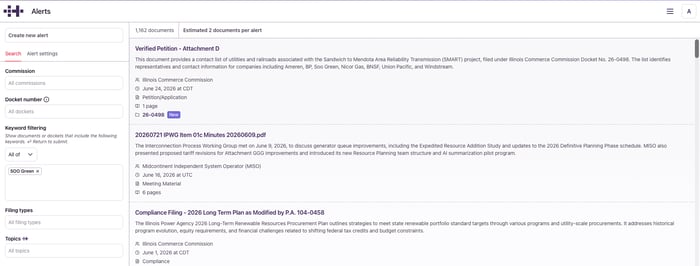
That’s almost 1,200 documents! Let's narrow things down further, starting by filtering our search to four regional organizations: MISO, PJM, Iowa Utility Commission, and Illinois Commerce Commission. This cuts our document list in half: If SOO Green is mentioned elsewhere, it’s probably as a citation for a document on some other project. Then, we can further trim the search by requesting specific filing types: applications and petitions, decisions and recommendations, requests, responses, and testimonies.
-Jul-08-2026-06-22-37-4996-PM.png?width=700&height=281&name=unnamed%20(1)-Jul-08-2026-06-22-37-4996-PM.png)
This gets us under 400 documents – and the platform estimates that this Alert will surface less than one document daily. At this level of specificity, it won’t overwhelm us with major notifications. But if something, anything, happens, we’ll be first to know.
Now that we’ve sufficiently narrowed our information universe, let’s write a query. Remember, that this query is a prompt for a large-language model, meaning all the tricks you know from ChatGPT or Claude apply here. The more detailed your prompt, the better opportunity the model has to return a quality response:
Provide updates on the SOO Green HVDC transmission project. Surface relevant stakeholders, LLC names, addresses, law firms, consultants, email addresses, and points of contact.
For testimonies, specify the person speaking and summarize their testimony with respect to the SOO Green project specifically. If the document describes HVDC planning in broad strokes, describe the overarching view on HVDC shown in the document.
If you want a specific output format, like headings or bullet points, you can put that in your query, too.
And voila! Here’s a “wide” alert tracking the SOO Green HVDC Project:
I would call this a “normal” project in that all of its parameters are not just knowable, they are also clearly known because of the proceeding itself, which states the location and companies involved. Other projects — particularly peaking power plants and datacenters — go to some lengths to obscure ownership structures and therefore the attention of peers, competitors, and the press. But these developers can’t hide everything, and the right alert can sniff out projects that weren’t meant to be found.
The Sneaky Way: Start Narrow, Widen Up
Let’s take another swing at this — but instead of looking up the project’s name, let’s work off the project’s LLC: SOO Green HVDC Link ProjectCo, LLC. As Halcyon readers will likely know, almost every energy project uses a specific limited liability company as an LLC solidifies a point of contact for lawyers, consultants, and PUCs. It also isolates financial risk in case the LLC goes bust. Some companies use descriptive names which map well to either the asset, or a parent company; others (and we are only slightly exaggerating) are closer to “Skibidi Kilovolt, LLC.”
The trick is to find the hooks that connect the LLC to companies you care about. Let’s start by keyword searching that formal LLC name and querying for stakeholders and points of contact:
-Jul-08-2026-06-26-20-6786-PM.png?width=1919&height=741&name=unnamed%20(2)-Jul-08-2026-06-26-20-6786-PM.png)
Flipping through these documents, we get our jackpot: names and an address. Remember that this letter below is a matter of public record and is already published by the Iowa Utilities Commission.
-Jul-08-2026-06-27-22-8387-PM.png?width=821&height=618&name=unnamed%20(3)-Jul-08-2026-06-27-22-8387-PM.png)
Now we can build a new alert. We’ll filter by the same commissions, but we’ll flip our keyword search from “All of” to “Any of.” If a document mentions a name or an address, but not necessarily both, it’ll still show up. Then, we’ll type in our more obscure tells for this project: names of key staff, business addresses, email slugs:
-Jul-08-2026-06-27-45-1312-PM.png?width=1918&height=755&name=unnamed%20(4)-Jul-08-2026-06-27-45-1312-PM.png)
This “narrow” Alert comes out to about 400 documents again, so it shouldn’t overwhelm you, even with a daily check. And if the team behind SOO Green were to start a new project with a different name, this sneaky Alert might catch it. Take a look for yourself.
Try It For Yourself
The SOO Green project is pretty innocuous, but you can use this same trick for power plants, datacenters, or any other project that’s trying to fly under the radar.
I personally love searching for corporate HQ addresses and email slugs. Careful developers know how to hide their tracks: they register the LLC’s address to a warehouse or a corporate filing service, send correspondence to a sock-puppet email, and only do business through a lawyer. But mistakes happen. Sometimes an email thread is provided as an exhibit, or an important name slips through, or someone fails to redact a company name once.
That’s a pretty bad oopsie for them. And with Halcyon Alerts acting as your private-eye robot, you’ll catch it first.
Subscribe for more content like this; reach out with questions: sayhi@halcyon.io; follow us on LinkedIn and Twitter